User Permission Levels Overview
Last updated: November 4, 2026
User permission levels in ServiceCore determine what each user can see, access, and manage within your account.
Each user is assigned a permission level that defines their access to features, data, and settings in your ServiceCore account.
Choosing the appropriate permission level gives your employees the tools they need in ServiceCore while protecting sensitive account information.
Click here to learn more about adding users.
Before You Start
Here are a few things to know before you continue:
The first person added to a ServiceCore account is the Account Owner by default.
If you're the only user in your account, you automatically have Owner permissions.
Please reach out to our Support team if you need to change who your Account Owner is.
Only the Assistant Manager (Asst. Mgr.), Manager, Admin, and Owner permission levels can edit other user’s permission levels/profiles.
You must have a higher permission level than the user you're editing. For example, only Owners and Admins can edit a Manager's permission level/profile.
Permission Levels Overview
Permission levels are designed to align with common operational roles, such as technicians (drivers), dispatchers, billing staff, and administrators.
There are 10 predefined permission levels available in ServiceCore:
Owner
Admin
Manager
Assistant Manager (Asst. Mgr.)
Billing Staff
Dispatcher
Order Taker
Tech - Billing (Driver who can take customer payments)
Technician (Driver)
Read Only
Please Note: There currently isn't a way to customize any of these permission levels.
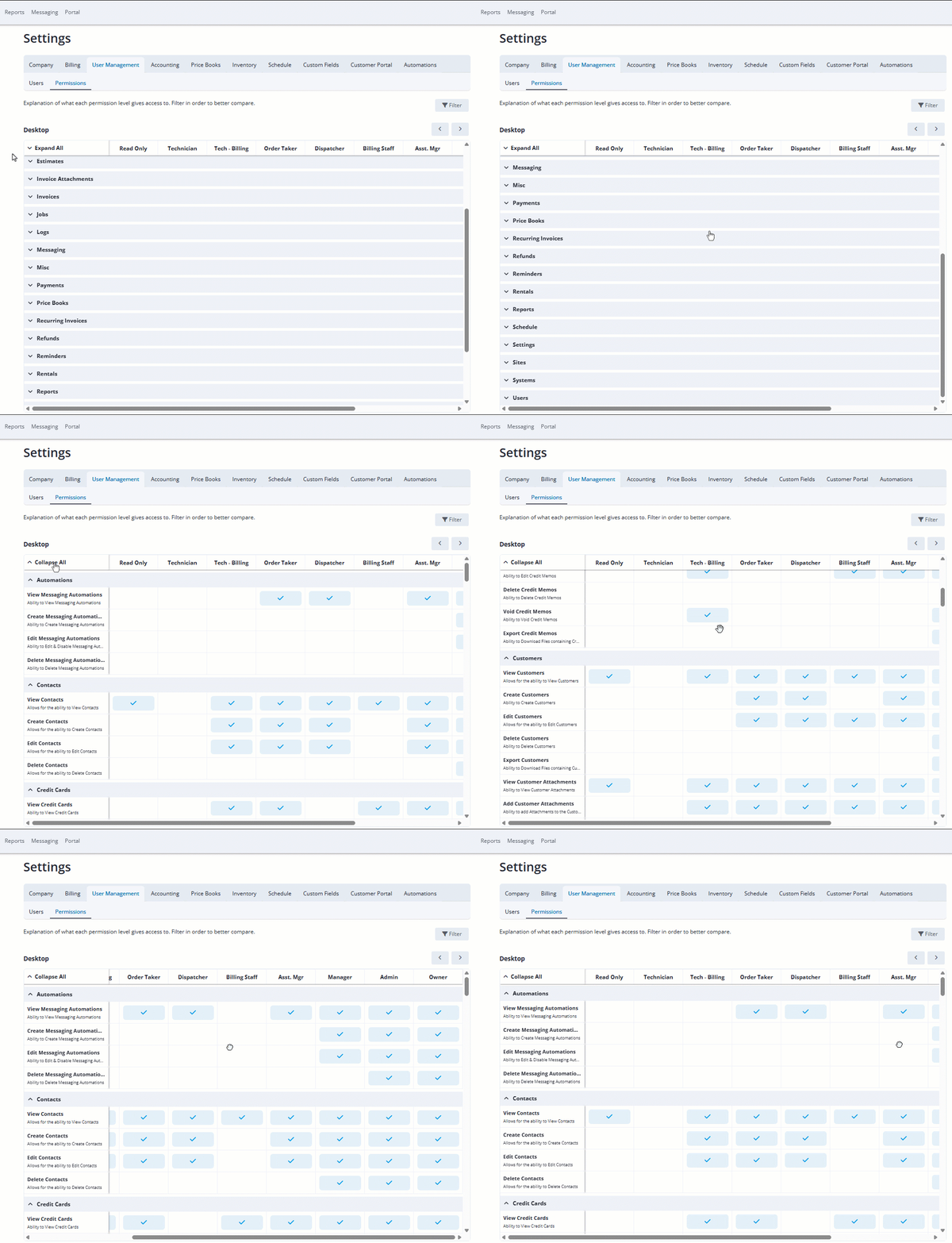
Permission Level Details
Your ServiceCore account (and its data/records) is broken down into 25 areas that each permission level may or may not have access to:
Automations
Contacts
Credit Cards
Credit Memo
Customers
Divisions
Estimates
Invoice Attachments
Invoices
Jobs
Logs
Messaging
Miscellaneous (Misc)
Payments
Price Books
Recurring Invoices
Refunds
Reminders
Rentals
Reports
Schedule
Settings
Sites
Systems
Users
TIP: For even more details, review the permissions table in your account's Settings.
Read Only
Area of ServiceCore | Access |
|---|---|
Automations | ❌ No Access |
Contacts | 👀 View Only |
Credit Cards | ❌ No Access |
Credit Memo | 👀 View Only |
Customers | 👀 View Only |
Divisions | ❌ No Access |
Estimates | 👀 View Only |
Invoice Attachments | 👀 View Only |
Invoices | 👀 View Only |
Jobs | 👀 View Only |
Logs | ❌ No Access |
Messaging | 👀 View Only |
Miscellaneous (Misc) | ❌ No Access |
Payments | 👀 View Only |
Price Books | 👀 View Only |
Recurring Invoices | 👀 View Only |
Refunds | 👀 View Only |
Reminders | 👀 View Only |
Rentals | 👀 View Only |
Reports | ❌ No Access |
Schedule | 👀 View Only |
Settings | ❌ No Access |
Sites | 👀 View Only |
Systems | 👀 View Only |
Users | ❌ No Access |
Technician
Area of ServiceCore | Access |
|---|---|
Automations | ❌ No Access |
Contacts | ❌ No Access |
Credit Cards | ❌ No Access |
Credit Memo | ❌ No Access |
Customers | ❌ No Access |
Divisions | ❌ No Access |
Estimates | ❌ No Access |
Invoice Attachments | ❌ No Access |
Invoices | ❌ No Access |
Jobs | ✏️ View, Edit, Complete (only jobs assigned to them) |
Logs | ❌ No Access |
Messaging | ❌ No Access |
Miscellaneous (Misc) | ❌ No Access |
Payments | ❌ No Access |
Price Books | ❌ No Access |
Recurring Invoices | ❌ No Access |
Refunds | ❌ No Access |
Reminders | ❌ No Access |
Rentals | ❌ No Access |
Reports | ❌ No Access |
Schedule | ✏️ View, Edit (only jobs assigned to them) |
Settings | ❌ No Access |
Sites | 👀 View Only |
Systems | ✏️ View, Create, Edit |
Users | ❌ No Access |
Tech – Billing
Area of ServiceCore | Access |
|---|---|
Automations | ❌ No Access |
Contacts | ✏️ View, Create |
Credit Cards | ✏️ View, Create |
Credit Memo | ✏️ View, Create, Edit, Void |
Customers | ✏️ View Customers & View, Add Attachments |
Divisions | ❌ No Access |
Estimates | ✏️ View, Create, Edit |
Invoice Attachments | ✏️ View, Add Attachments |
Invoices | ✏️ View, Create, Edit, Email Invoices |
Jobs | ✏️ View, Edit, Complete |
Logs | ❌ No Access |
Messaging | ❌ No Access |
Miscellaneous (Misc) | ❌ No Access |
Payments | ✏️ View, Create, Edit |
Price Books | 👀 View Only |
Recurring Invoices | 👀 View Only |
Refunds | ✏️ View, Create |
Reminders | ✏️ View, Create, Edit |
Rentals | 👀 View Only |
Reports | ❌ No Access |
Schedule | ✏️ View, Edit (only jobs assigned to them) |
Settings | ❌ No Access |
Sites | ✏️ View, Create, Edit |
Systems | ✏️ View, Create, Edit |
Users | ❌ No Access |
Order Taker
Area of ServiceCore | Access |
|---|---|
Automations | 👀 View Only |
Contacts | ✏️ View, Create, Edit |
Credit Cards | ✏️ View, Create |
Credit Memo | ❌ No Access |
Customers | ✏️ View, Create, Edit Customers & View, Add Attachments & View Accounting Metrics |
Divisions | ❌ No Access |
Estimates | ✏️ View, Create, Edit |
Invoice Attachments | ✏️ View, Add |
Invoices | ✏️ View, Create, Edit |
Jobs | ✅ Full Access |
Logs | ❌ No Access |
Messaging | 👀 View Only |
Miscellaneous (Misc) | ❌ No Access |
Payments | ✏️ View, Create, Edit |
Price Books | 👀 View Only |
Recurring Invoices | ✅ Full Access |
Refunds | ❌ No Access |
Reminders | ✏️ View, Create, Edit |
Rentals | ✏️ View, Create, Edit |
Reports | ❌ No Access |
Schedule | ❌ No Access |
Settings | 👀 View Inventory Settings |
Sites | ✏️ View, Create, Edit |
Systems | ✏️ View, Create, Edit |
Users | ❌ No Access |
Dispatcher
Area of ServiceCore | Access |
|---|---|
Automations | 👀 View Only |
Contacts | ✏️ View, Create, Edit |
Credit Cards | ❌ No Access |
Credit Memo | ❌ No Access |
Customers | ✏️ View, Create, Edit Customers & View, Add Attachments |
Divisions | ❌ No Access |
Estimates | ❌ No Access |
Invoice Attachments | ❌ No Access |
Invoices | ❌ No Access |
Jobs | ✏️ View, Create, Edit, Complete, End Recurring Jobs |
Logs | ❌ No Access |
Messaging | 👀 View Sent Emails, Email Unsubscribes, Scheduled Reminders |
Miscellaneous (Misc) | ❌ No Access |
Payments | ❌ No Access |
Price Books | ❌ No Access |
Recurring Invoices | ❌ No Access |
Refunds | ❌ No Access |
Reminders | ✏️ View, Create, Edit |
Rentals | ✏️ View, Create, Edit |
Reports | ✏️ View Operations, Finance, Log Reports & View, Create, Edit Shared Reports |
Schedule | ✏️ View, Edit |
Settings | 👀 View Inventory Settings |
Sites | ✏️ View, Create, Edit |
Systems | ✏️ View, Create, Edit |
Users | ❌ No Access |
Billing Staff
Area of ServiceCore | Access |
|---|---|
Automations | ❌ No Access |
Contacts | 👀 View Only |
Credit Cards | ✏️ View, Create |
Credit Memo | ✏️ View, Create, Edit |
Customers | ✏️ View, Edit Customers & View, Add Attachments & View Accounting Metrics & Assign VIP, Suspended Stages |
Divisions | ❌ No Access |
Estimates | ✏️ View, Create, Edit |
Invoice Attachments | ✅ Full Access |
Invoices | ✏️ View, Create, Edit, Email Invoices |
Jobs | ✏️ View, Edit |
Logs | ✏️ View Payment, Invoice History & Edit Transactions in a Closed Accounting Period |
Messaging | 👀 View Sent Emails, Email Unsubscribes, Scheduled Reminders |
Miscellaneous (Misc) | 👀 View Global Accounting Metrics |
Payments | ✏️ View, Create, Edit |
Price Books | 👀 View Only |
Recurring Invoices | ✅ Full Access |
Refunds | 👀 View Only |
Reminders | ✏️ View, Create, Edit |
Rentals | ✏️ View, Edit |
Reports | ✏️ View Finance, Accounting, Sales, Log Reports & View, Create, Edit Shared Reports |
Schedule | ❌ No Access |
Settings | ❌ No Access |
Sites | ✏️ View, Edit |
Systems | ✏️ View, Edit |
Users | ❌ No Access |
Assistant Manager (Asst. Mgr.)
Area of ServiceCore | Access |
|---|---|
Automations | 👀 View Only |
Contacts | ✏️ View, Create, Edit |
Credit Cards | ✏️ View, Create |
Credit Memo | ✏️ View, Create, Edit |
Customers | ✏️ View, Create, Edit Customers & View, Add Attachments & View Accounting Metrics & Assign VIP, Suspended Stages |
Divisions | ✏️ View, Create, Edit |
Estimates | ✏️ View, Create, Edit |
Invoice Attachments | ✏️ View, Add |
Invoices | ✏️ View, Create, Edit |
Jobs | ✏️ View, Create, Edit, Complete, End Recurring Jobs |
Logs | 👀 View Job History |
Messaging | 👀 View SMS Messaging, Sent Emails, Email Unsubscribes, Scheduled Reminders |
Miscellaneous (Misc) | 👀 View Portal Requests |
Payments | ✏️ View, Create, Edit |
Price Books | ✏️ View, Create, Edit |
Recurring Invoices | ✅ Full Access |
Refunds | ✏️ View, Create, Edit |
Reminders | ✏️ View, Create, Edit |
Rentals | ✏️ View, Create, Edit |
Reports | ✏️ View Operations, Finance, Sales, Log Reports & View, Create, Edit Shared Reports |
Schedule | ✏️ View, Edit |
Settings | ✏️ View, Create, Edit Accounting Settings, Custom Fields Settings, Schedule Settings, Inventory Settings & View Company Settings |
Sites | ✏️ View, Create, Edit |
Systems | ✏️ View, Create, Edit |
Users | ✏️ View, Edit |
Manager
Area of ServiceCore | Access |
|---|---|
Automations | ✏️ View, Create, Edit |
Contacts | ✅ Full Access |
Credit Cards | ✅ Full Access |
Credit Memo | ✏️ View, Create, Edit, Void, Export |
Customers | ✅ Full Access |
Divisions | ✅ Full Access |
Estimates | ✅ Full Access |
Invoice Attachments | ✅ Full Access |
Invoices | ✏️ View, Create, Edit, Void, Export, Email |
Jobs | ✅ Full Access |
Logs | 👀 View Audit Logs, Job History, Payment History |
Messaging | 👀 View SMS Messaging, Sent Emails, Email Unsubscribes, Scheduled Reminders |
Miscellaneous (Misc) | 👀 View Portal Requests, Yards |
Payments | ✅ Full Access |
Price Books | ✅ Full Access |
Recurring Invoices | ✅ Full Access |
Refunds | ✏️ View, Create, Edit, Export, Void |
Reminders | ✅ Full Access |
Rentals | ✅ Full Access |
Reports | ✏️ View Operations, Finance, Accounting, Sales, Log Reports & View, Create, Edit Shared Reports |
Schedule | ✏️ View, Edit |
Settings | ✏️ View, Create, Edit, all Settings EXCEPT Billing Settings & Export Items |
Sites | ✅ Full Access |
Systems | ✅ Full Access |
Users | ✏️ View, Edit, Delete |
Admin
Area of ServiceCore | Access |
|---|---|
Automations | ✅ Full Access |
Contacts | ✅ Full Access |
Credit Cards | ✅ Full Access |
Credit Memo | ✏️ View, Create, Edit, Void, Export |
Customers | ✅ Full Access |
Divisions | ✅ Full Access |
Estimates | ✅ Full Access |
Invoice Attachments | ✅ Full Access |
Invoices | ✏️ View, Create, Edit, Void, Export, Email |
Jobs | ✅ Full Access |
Logs | ✅ Full Access |
Messaging | ✅ Full Access |
Miscellaneous (Misc) | ✅ Full Access |
Payments | ✅ Full Access |
Price Books | ✅ Full Access |
Recurring Invoices | ✅ Full Access |
Refunds | ✅ Full Access |
Reminders | ✅ Full Access |
Rentals | ✅ Full Access |
Reports | ✅ Full Access |
Schedule | ✏️ View, Edit |
Settings | ✏️ View, Create, Edit, all Settings EXCEPT Billing Settings & Export Items |
Sites | ✅ Full Access |
Systems | ✅ Full Access |
Users | ✅ Full Access |
Owner
Area of ServiceCore | Access |
|---|---|
Automations | ✅ Full Access |
Contacts | ✅ Full Access |
Credit Cards | ✅ Full Access |
Credit Memo | ✅ Full Access |
Customers | ✅ Full Access |
Divisions | ✅ Full Access |
Estimates | ✅ Full Access |
Invoice Attachments | ✅ Full Access |
Invoices | ✅ Full Access |
Jobs | ✅ Full Access |
Logs | ✅ Full Access |
Messaging | ✅ Full Access |
Miscellaneous (Misc) | ✅ Full Access |
Payments | ✅ Full Access |
Price Books | ✅ Full Access |
Recurring Invoices | ✅ Full Access |
Refunds | ✅ Full Access |
Reminders | ✅ Full Access |
Rentals | ✅ Full Access |
Reports | ✅ Full Access |
Schedule | ✅ Full Access |
Settings | ✅ Full Access |
Sites | ✅ Full Access |
Systems | ✅ Full Access |
Users | ✅ Full Access |
Update a User’s Permission Level
Sometimes an employee changes roles or needs more/less access to different areas of your ServiceCore account, so we've made it super easy to adjust permission levels in a user's profile.
To update a user’s permission level, just follow the instructions below:
Click your name in the top right corner.
Click into “Settings”.
Click into “User Management”.

Click the down arrow to the right of the user.
Select “Edit User” in the drop-down menu.
TIP: You can quickly see each user’s permission level in the Permission Level column. You can also filter your users list by permission level.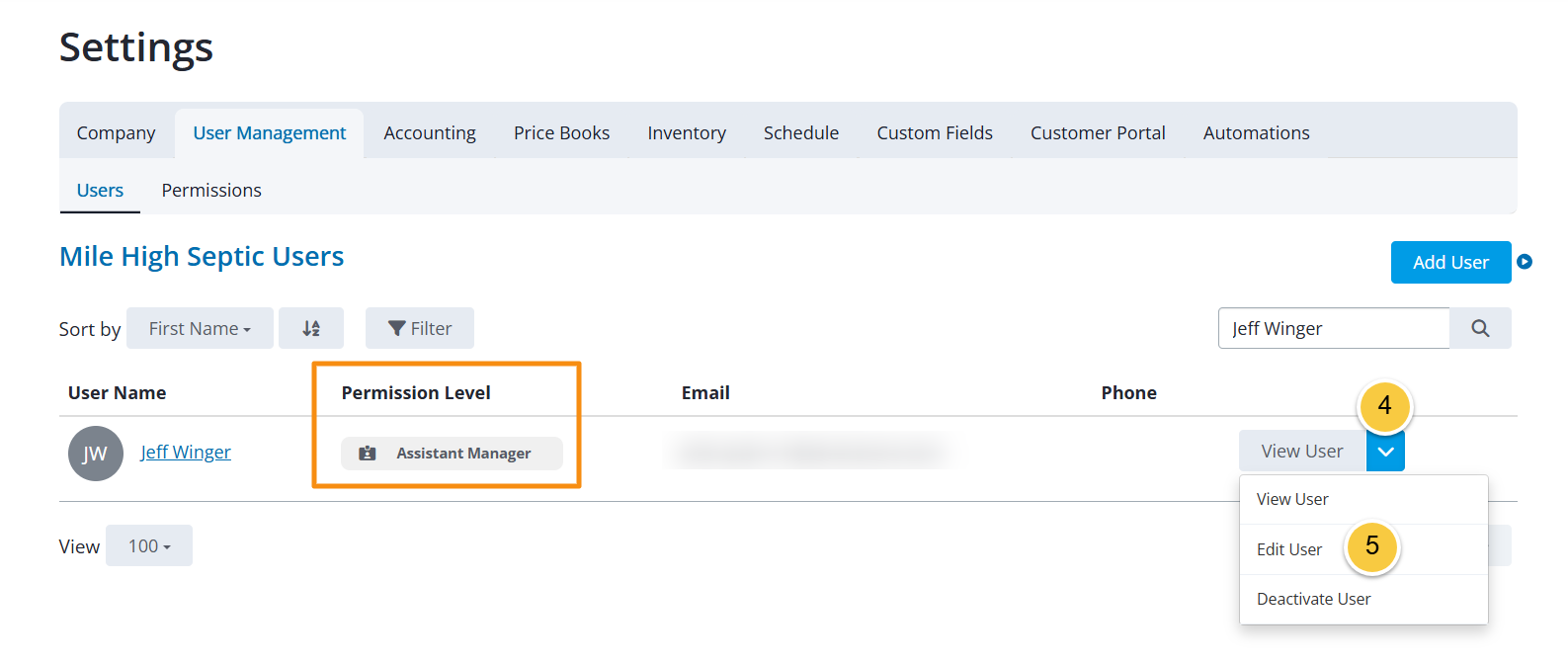
Update the Permission Level for the User.
TIP: Click “Permission Levels” to learn more about the access each level has.Click “Save.”

If you have any questions, please reach out to our Support team through the chat widget on the bottom of this page or by sending an email to support@servicecore.com!